7 Best USB Fingerprint Readers for Windows 11 (2026)
Disclosure: This post may contain affiliate links. If you purchase through these links, we may earn a small commission at no extra cost to you.
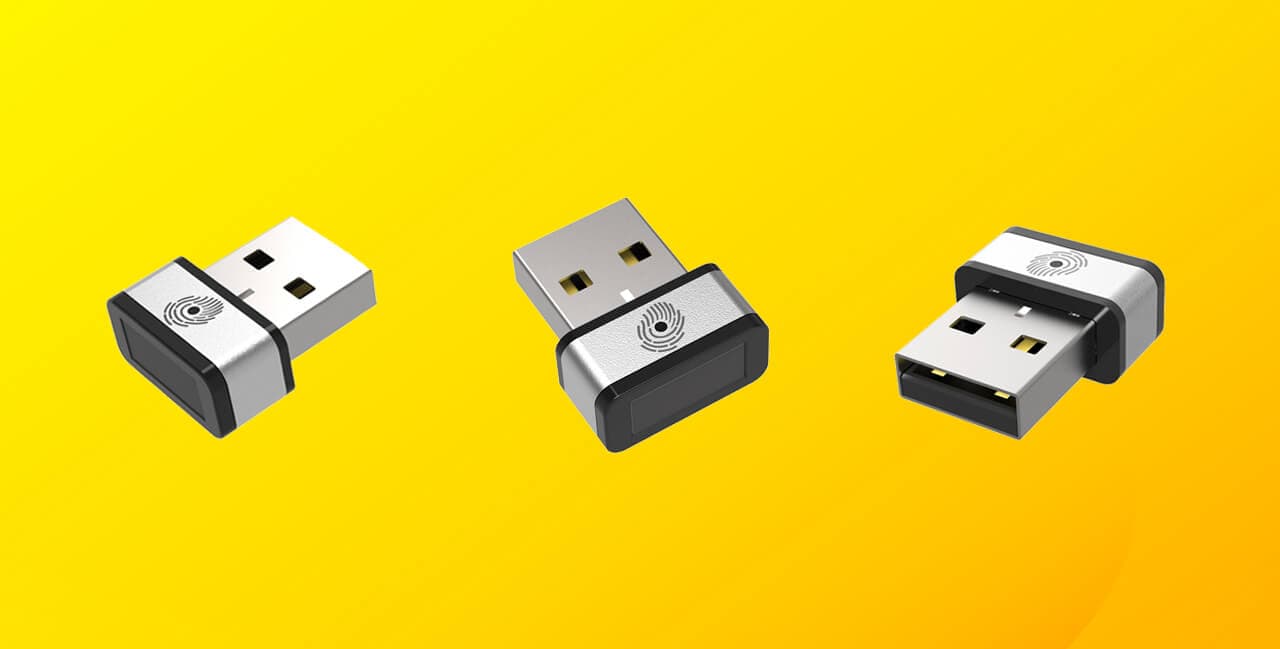
A USB fingerprint reader adds a fast, secure way to sign in to your PC with a touch — no typing a password. It's the easiest upgrade you can make to a desktop (which almost never has a built-in reader) or an older laptop that shipped without one. And in 2026 these little devices do more than unlock Windows: many now double as FIDO2 security keys, so your fingerprint can log you into your Microsoft, Google, and other accounts with passkeys.
A lot has changed since this guide first ran, so two quick ground rules before the picks. First, Windows 10 reached end of support on October 14, 2025 — Windows 11 (with Windows Hello) is the baseline now, and any reader still marketed for "Windows 7/8" is simply using dated copy; the good ones work fine on Windows 11. Second, the modern reason to own one isn't the old "encrypt your files" pitch — it's passwordless sign-in and passkeys. Here are the seven best USB fingerprint readers you can buy today.
Windows Hello vs. FIDO2: which do you need?
This is the one distinction that decides which reader to buy:
- A Windows Hello fingerprint reader logs you into your PC. That's it — fast, convenient, and all most people need.
- A FIDO2 reader (also a security key) does that and logs you into online accounts and passkeys — Microsoft, Google, GitHub, and more — across Chrome, Edge, Firefox, and Safari, because your fingerprint unlocks a cryptographic passkey stored on the device itself.
If you just want to unlock your computer, any Windows Hello reader works. If you also want passwordless login on the web (increasingly the direction Microsoft and Google are pushing, especially since Windows Hello added synced passkeys in late 2025), get a FIDO2 model like the Kensington VeriMark Guard or TrustKey B210H below.
Quick comparison
| Reader | Connector | Windows Hello | FIDO2 / passkeys | Approx. price |
|---|---|---|---|---|
| Kensington VeriMark Guard | USB-A / USB-C | Yes | Yes | ~$50–60 |
| Kensington VeriMark IT | USB-A (C on 2.0) | Yes (+ for Business) | Yes | ~$50–72 |
| Kensington VeriMark Desktop | USB-A (cabled) | Yes (+ for Business) | Yes | ~$80–100 |
| BIO-key EcoID II | USB-C | Yes | No | ~$35–45 |
| BIO-key SideSwipe | USB-A (nano) | Yes | No | ~$35–45 |
| TrustKey B210H | USB-A (C sibling) | Yes | Yes | ~$35–45 |
| TEC TE-FPA3-MC | USB-A | Yes (ESS) | No | ~$30–40 |
How we picked
We focused on readers that are actually buyable now and Windows 11–ready, prioritizing touch sensors (more reliable than swipe), match-on-sensor security (your fingerprint is verified on the device and never sent to the PC), and reputable brands over the flood of no-name Amazon dongles. Where a reader also works as a FIDO2 passkey key, we flagged it, since that's the most future-proof choice. We dropped the old picks that are now discontinued or obsolete — the UPEK Eikon, Digital Persona 88003, and Octatco EzFinger among them. Prices are approximate; use the Amazon links for the live figure.
1. Kensington VeriMark Guard — Best overall
- Connector: USB-A and USB-C versions available
- Sign-in: Windows Hello + FIDO2 / WebAuthn / FIDO U2F
- Sensor: Match-in-Sensor touch, anti-spoofing, up to 10 fingerprints
- Setup: Plug-and-play, no drivers
The VeriMark Guard is the most versatile reader here, and the one to get if you want a single device to do everything. It signs you into Windows and acts as a cross-platform FIDO2 security key for passwordless login to your online accounts, working across Windows, macOS, and ChromeOS and all the major browsers. The touch sensor (not a swipe) is quick and forgiving, and there's nothing to install.
Pros: Handles both PC sign-in and passkey/online 2FA, genuinely cross-platform, reputable brand, reliable touch sensor.
Who it's for: Anyone who wants one device for Windows login and passwordless web login. Weakness: Costs more than no-name readers, and as a security-key-first device it leans on FIDO2 rather than the deepest Windows Hello enterprise integration (the VeriMark IT below is built for that).
2. Kensington VeriMark IT — Best for Windows Hello for Business
- Connector: USB-A (USB-C on the 2.0 refresh)
- Sign-in: Windows Hello and Windows Hello for Business, FIDO2 / U2F
- Sensor: Match-in-Sensor touch, 360° readability, anti-spoofing, up to 10 fingerprints
- Setup: Tap-and-Go enrollment
If you're on a managed Windows 11 machine — or you just want the deepest Microsoft integration — the VeriMark IT is tuned for it, with Windows Hello for Business support and, on the newer 2.0 model, native single sign-on to Entra ID and Microsoft 365. It's a tiny dongle you can leave plugged in.
Pros: Deep Microsoft/enterprise integration, small footprint, trusted brand.
Who it's for: Windows 11 users and businesses on Entra ID who want Windows Hello for Business. Weakness: Windows-centric — less useful cross-platform than the Guard — and the older Gen2 model is USB-A only.
3. Kensington VeriMark Desktop — Best for desktop towers
- Connector: USB-A on a ~3.9 ft (1.2 m) cable
- Sign-in: Windows Hello + Windows Hello for Business, FIDO2 / U2F
- Sensor: Match-in-Sensor touch, anti-spoofing
The whole point of the VeriMark Desktop is the cable. If your PC's USB ports are behind or under the desk, a flush dongle is useless — this one puts the sensor right where your hand rests. Otherwise it carries the same touch sensor and enterprise features as the rest of the VeriMark line.
Pros: The cable makes it genuinely usable on a tower, plus a touch sensor and enterprise features.
Who it's for: Desktop owners whose USB ports are out of easy reach. Weakness: The priciest Kensington option, and overkill if you're on a laptop.
4. BIO-key EcoID II — Best driverless "just works" reader
- Connector: USB-C
- Sign-in: Windows Hello (Microsoft-qualified)
- Sensor: Large touch pad
- Setup: Driverless on Windows 11
If you just want fast, reliable Windows 11 sign-in and don't care about passkeys, the EcoID II is the pick. Its standout feature is a larger touch sensor than the tiny nano dongles, which makes it more forgiving of finger placement, and it's plug-and-play on Windows 11. BIO-key's readers have a long reputation for reliability.
Pros: Big, forgiving touch sensor, driverless setup, proven brand.
Who it's for: People who want dependable Windows Hello sign-in and value an easy-to-hit sensor. Weakness: Windows Hello only — no FIDO2/passkey support — and USB-C only, so you'll need an adapter for a USB-A port.
5. BIO-key SideSwipe — Best compact nano dongle
- Connector: USB-A (near-flush nano)
- Sign-in: Windows Hello (Microsoft-qualified)
- Sensor: RF swipe
The SideSwipe is small enough to leave permanently plugged into a laptop and forget about — it barely protrudes from the port. It's a reputable, Microsoft-qualified alternative to the anonymous mini-readers that fill Amazon's listings. (BIO-key's SideTouch is a touch-sensor sibling if you prefer press-to-read.)
Pros: Extremely compact, name-brand, qualified for Windows Hello.
Who it's for: Laptop users who want a barely-there reader they can leave attached. Weakness: It's a swipe sensor, which is less convenient than a touch pad, and it's Windows Hello only (no FIDO2).
6. TrustKey B210H — Best budget FIDO2 + Windows Hello combo
- Connector: USB-A (USB-C sibling: B220H)
- Sign-in: FIDO2 + FIDO U2F + Windows Hello
- Sensor: Match-on-sensor with a dedicated secure chip
- Works with: Windows, macOS, Linux + major browsers
The TrustKey B210H gets you the same do-both capability as the VeriMark Guard — PC sign-in and passkey/online 2FA — for less money. It has a dedicated secure element for match-on-sensor verification and works for passwordless login to FIDO2 sites like Google, Microsoft, and GitHub.
Pros: True FIDO2/passkey support plus Windows Hello at a budget price, with a dedicated security chip.
Who it's for: Budget-minded buyers who still want passkey capability, not just PC login. Weakness: A smaller, less-known brand than Kensington, and the sensor is small.
7. TEC TE-FPA3-MC — Cheapest reader with hardened ESS security
- Connector: USB-A mini dongle
- Sign-in: Windows Hello, advertises Enhanced Sign-in Security (ESS)
- Sensor: Match-on-sensor touch, ~0.05 s match, AES-256
Most budget readers skip the hardened security path, but the TEC TE-FPA3-MC advertises match-on-sensor and ESS support (Windows' TPM-isolated biometric path, which external readers only gained access to via a February 2026 Windows update). If those claims hold up, it's a lot of security for around $30–40.
Pros: One of the few budget readers claiming ESS and match-on-sensor, with a quick touch sensor.
Who it's for: Bargain hunters who still want the hardened security path rather than a generic no-name. Weakness: It's a lesser-known brand — verify the ESS claim and check recent reviews before relying on it for security. Windows only.
Buyer's guide: what to look for in 2026
- Windows 11 / Windows Hello certified. Windows 10 is end-of-life as of October 2025, so target Windows 11. Look for readers listed as "Microsoft Hello-Ready" or Windows 11 qualified.
- FIDO2/passkey support — do you want it? If you want passwordless login to online accounts, choose a device that's also a FIDO2 key (VeriMark Guard, TrustKey B210H). Pure Windows Hello readers (EcoID II, SideSwipe, most no-names) log you into the PC only.
- USB-A vs USB-C. Match your port. Desktops usually have USB-A; newer laptops lean USB-C. Several models (Guard, EcoID II, TrustKey) come in both.
- Touch beats swipe. A press-and-hold touch sensor is more reliable and convenient than a drag-across swipe sensor. Prefer touch (VeriMark, EcoID II, TEC).
- Match-on-sensor / match-on-chip. Your fingerprint is verified on the device and never sent to the PC — more secure, and a prerequisite for ESS.
- ESS support (new in 2026). For the hardened, TPM-isolated path on an external reader, you need a device certified for Enhanced Sign-in Security plus a Windows 11 PC with TPM 2.0. It's a nice-to-have, not essential for everyday convenience.
- Stick to known brands. Kensington, BIO-key, and TrustKey are safer bets than the unbranded "0.1-second, free password manager" listings that dominate cheap search results.
Frequently asked questions
Do USB fingerprint readers work with Windows 11? Yes. Any Windows Hello–compatible USB reader works with Windows 11 — enroll it under Settings → Accounts → Sign-in options → Fingerprint. Since Windows 10 reached end of support in October 2025, Windows 11 is the OS to target, and most quality readers are driverless on it.
What's the difference between a fingerprint reader and a FIDO2 security key? A plain Windows Hello reader logs you into your PC. A FIDO2 reader (like the VeriMark Guard or TrustKey B210H) does that and logs you into online accounts and passkeys — Microsoft, Google, GitHub — because your fingerprint unlocks a passkey stored on the device. If you only need PC login, either works; for passwordless web login too, get a FIDO2 model.
Can I use one to log into websites and passkeys? Only if it's FIDO2/WebAuthn-capable. The Guard and TrustKey support passkeys across Chrome, Edge, Firefox, and Safari; Windows Hello also supports synced passkeys as of late 2025. Windows-Hello-only readers can't do website login.
Do they work on a Mac? Mostly not for system login — most are Windows Hello only and won't unlock macOS. Cross-platform FIDO2 keys (VeriMark Guard, TrustKey) do work for passkey/WebAuthn login in browsers on a Mac, but they won't replace Touch ID for unlocking the Mac itself.
Are cheap no-name fingerprint readers safe? They're a risk. Look for match-on-sensor security, a known brand, and ideally ESS support. Many sub-$25 listings bundle a dubious "offline password manager," use dated marketing, and make unverifiable security claims. Prefer Kensington, BIO-key, or TrustKey.
Do I need one if my laptop already has a fingerprint reader? No. If your laptop already has a built-in Windows Hello sensor, an external reader is redundant — and the built-in one usually gets the deeper, hardened security path automatically. External USB readers are for desktops and for older or business laptops that lack a built-in sensor.
Final words
For most people, the Kensington VeriMark Guard is the best USB fingerprint reader in 2026 — it unlocks your PC and works as a FIDO2 passkey key, all plug-and-play. If you only need Windows sign-in, the BIO-key EcoID II is a reliable, big-sensor pick, and the TrustKey B210H gets you FIDO2 capability on a budget. Match the connector to your PC's ports, favor a touch sensor over a swipe, and stick to a reputable brand — and you'll be signing in with a fingertip in a couple of minutes.
Securing the rest of your setup? You might also like our guide to the best password managers and the best free antivirus software.

Tech enthusiast and founder of Technize. Passionate about making technology accessible and helping people make smarter buying decisions.